How can I help dyslexic students to plan and organise their writing?
In our recent DocsPlus & Dyslexia webinar, we asked attendees to share the main literacy challenges their students struggle with.
94% told us that their students find it difficult to plan and organise their ideas.
Planning is such a crucial part of the writing journey because it:
- Helps students organize their thoughts and create more coherent final pieces.
- Reduces the anxieties associated with writing.
- Improves time management and helps students to meet deadlines.
- Helps students develop links throughout their writing and to present their ideas logically.
- Leads to stronger writing skills and academic success.
With that in mind, here are three ways you can use DocsPlus to help students organise and plan their work:
1. Organise ideas with mind maps
One helpful approach is to teach students how to create outlines or mind maps to plan their writing. This can help them visually see the structure of their ideas and how they connect to each other. Also, giving students pre-made graphic organisers or templates helps guide them throughout the planning process.
The challenges students often face when creating mind maps include:
- Visual-spatial challenges: mind maps are very visual but deciding where to write each section, how big to draw a ‘bubble’, or running out of paper can stop students from starting the planning process.
- Cognitive overload: some students find planning their ideas, the mechanics of writing and presenting it visually collectively overwhelming.
WorkSpace
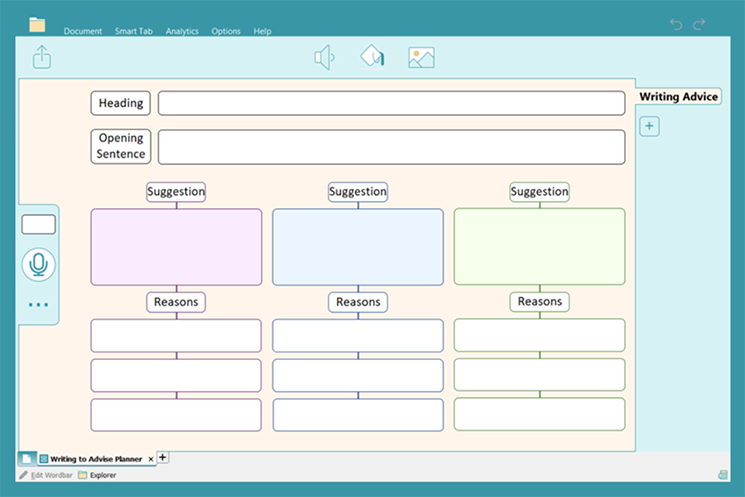
DocsPlus’ WorkSpace is a fantastic tool for organising ideas. Students can create them in the moment using one of the six templates provided. LearningGrids offers many pre-made resources for different subjects and writing styles, covering a wide range of topics.
Using WorkSpace, students can:
- Have their key words read back to them at the click of a button,
- Focus on the content first, because WorkSpace adjusts the bubble size and layout automatically,
- Use pre-made planning grids so that everyone has a successful starting point.

Students can use our writing frames and planners to organise their ideas for essays across a range of subjects. Particular favourites of DocsPlus customers include our Essay Planner WorkSpace, the Writing to Advise Planner, and the Recount Planner. These are fantastic for helping students to plan a clear cohesive piece of curriculum writing.
How does WorkSpace help dyslexic learners?
DocsPlus reduces many of the reading and writing barriers commonly experienced by dyslexia learners because it:
- Encourages visual learning which can make concepts easier to understand and remember.
- Offers instant reading support with a right-click.
- Requires no physical writing, students can utilise spell check, word prediction and record their ideas verbally…
2. Record ideas verbally first
Another useful strategy for students to organise their thoughts before writing is to record their ideas verbally first.
Recording ideas aloud is a great way to brainstorm and collect new ideas before starting the writing process. This method can also help students who struggle with writing to explain their ideas more clearly.
Practically, recording ideas as part of the planning phase can be a challenge if you need to set up separate pieces of equipment to do so, and it can be difficult to keep track of which audio notes belong with which piece of work if students are working on multiple projects.
Voice Notes
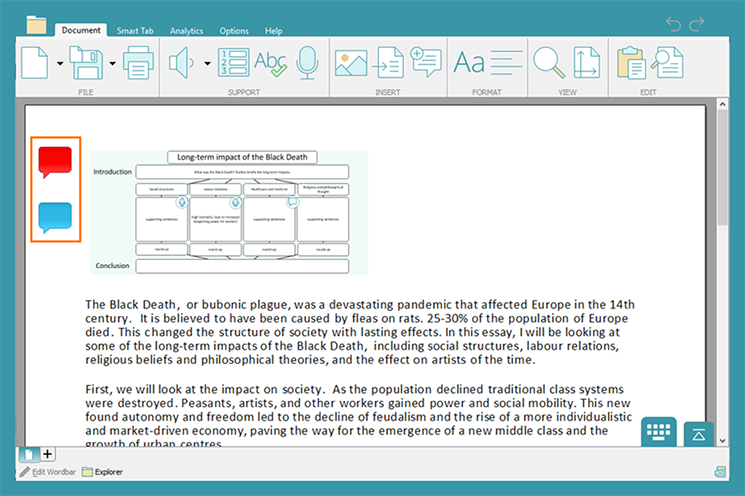
Voice Notes in DocsPlus are an excellent tool for students who struggle to remember their ideas. Voice Notes use a built-in microphone so they are easy to record. Students can delete Voice Notes, re-record them, and they are always available to listen to on the page.
Using Voice Notes, students can:
- Record directly into the DocsPlus Document they are working on
- Capture content and structure ideas or reminders of the task.
- Listen to their Voice Notes whenever they want
How can Voice Notes help dyslexic learners?
Recording ideas first can help students produce more logical and well-structured essays. Here’s how Voice Notes can help dyslexic learners plan and organise their writing:
- Students don’t need to write and the associated difficulties with spelling, grammar and handwriting.
- Recording ideas improves students’ focus on content because they don’t need to think about the mechanics of writing.
- Speaking out loud can encourage further thinking so learners may make connections they might not have noticed otherwise.
3. Provide key vocabulary
Providing key words boosts students' understanding of the subject and improves their ability to clearly communicate their ideas. This can be especially helpful for EAL students, or those who have difficulty remembering key terms.
With key vocabulary support, students can feel more confident as they organise their ideas into paragraphs. Having access to a list of key words can help students organise their thoughts as they write, using the vocabulary to structure the content of each paragraph, and how each paragraph links.
Students might struggle to access key vocabulary because:
- They are overwhelmed by the number of words given to them.
- They find it difficult to decode or read new vocabulary.
- It can be difficult to remember to use key vocabulary and to copy it accurately.
Wordbars
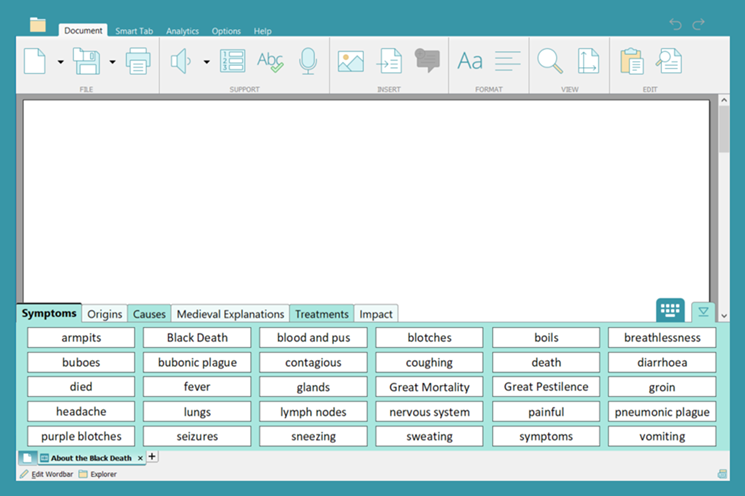
Wordbars collate topic keywords, including tier vocabulary, so they are easy for students to include in their writing. Wordbars are word grids with tabs for clear organisation.
Using Wordbars, students can:
- Right-click on any word to listen to it first.
- Use the tabs to organise their writing – tabs can include key words for each paragraph or section.
- Reduce the cognitive load otherwise required to remember and include vocabulary with point-and-click access.
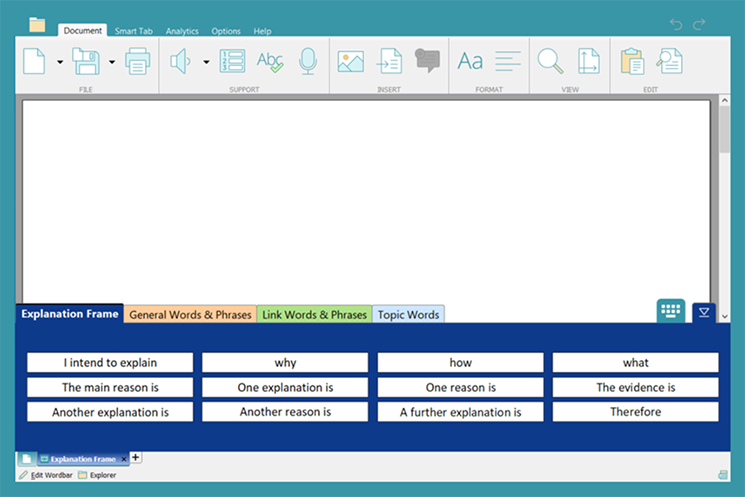
Explanation Frame or Shakespeare Sentence Stems provide sentence starters and key phrases to help students structure their writing. Writing frames can support students write about a range of topics across the curriculum.
How do Wordbars help dyslexic learners?
Providing key words to dyslexic learners helps reduce the challenges they face with language processing, reading, and spelling. Each of these skills can help them as they plan and organise their writing. Using Wordbars in DocsPlus can help dyslexic learners because:
- Key words can be read aloud – having access to key vocabulary is only useful if students can read them.
- Once students have included the key vocabulary in their sentence, DocsPlus can read it back so they can check it has been used in the correct context.
Teaching students effective planning and organising strategies can empower them to become more confident and successful writers. With the right tools and support, students can produce well-structured and coherent pieces of writing across the curriculum.
This is just a few examples of how you might use DocsPlus to support students with planning in lessons! If you would like more information, you can:
- Book a meeting with your Partnership Consultant.
- Explore our LearningGrids resource bank for writing resources for your learners.
