DocsPlus Menu
Help dyslexic learners overcome their barriers to writing
In secondary school, the volume of reading and writing expected each day increases steadily as students progress towards exams. This can be a real challenge for students with dyslexia, and lead to them feeling stressed and anxious when faced with literacy-related tasks.
DocsPlus will help your students to overcome writing frustration, access curriculum content, and become more confident and successful learners.
DocsPlus will help your students to overcome writing frustration, access curriculum content, and become more confident and successful learners.

Help students organise and plan their writing
Students with dyslexia often find longer pieces of written work harder to organise and structure. Problems such as a short-term working memory deficit and slow information processing speed can make it very difficult for them to express their initial thoughts and ideas in the form of a logical, flowing document.
WorkSpace provides DocsPlus users with a built-in planning tool to help them prepare for writing. Students can manipulate and link any combination of words, pictures and sounds together on their WorkSpace, mapping out their ideas in a way that is easier to understand and particularly effective for more visual learners.
WorkSpace provides DocsPlus users with a built-in planning tool to help them prepare for writing. Students can manipulate and link any combination of words, pictures and sounds together on their WorkSpace, mapping out their ideas in a way that is easier to understand and particularly effective for more visual learners.
Enable learners to capture ideas and rehearse their sentences
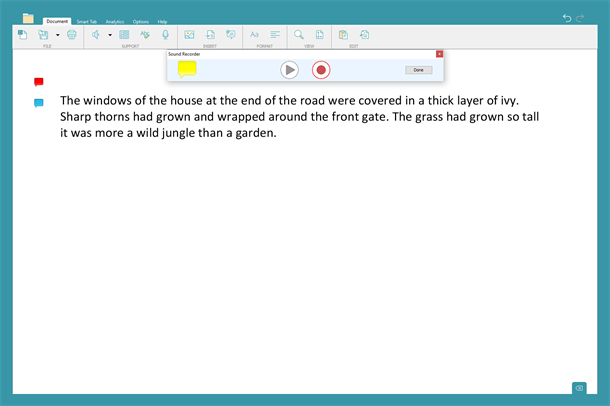
When students select the Voice Notes tool, they will be given the opportunity to record their own audio notes. This is a great way for them to vocally rehearse their sentences in preparation for writing.
Voice Notes can also be used as an alternative method for recording initial ideas – giving students with dyslexia a valuable opportunity to capture their thoughts without being distracted by the mechanics of writing.
Voice Notes can also be used as an alternative method for recording initial ideas – giving students with dyslexia a valuable opportunity to capture their thoughts without being distracted by the mechanics of writing.

Help students overcome spelling frustration
DocsPlus’ integrated word predictor supports dyslexic students by providing a list of potential words for them to select from as they type. When they start typing, the predictor generates a list of likely words that begin with those letters. Right-clicking on any word in the predictor’s list triggers the speech engine to read it aloud, allowing students to listen to the words and independently select the one they want to use.

If there are certain words that your students regularly want to include in their writing that are not currently being suggested by the predictor, proper nouns or unusual curriculum vocabulary for example, you can use the Word Pool tool to add them to the program’s knowledge base. You can even link common misspellings to them, enabling you to tackle specific spelling patterns your students may be struggling with.

Provide writing support grids tailored to each student’s learning needs
DocsPlus removes the writing block that hinders the development of many learners with dyslexia by providing point-and-click access to whole words and phrases that are relevant to the current writing task. Students can listen to each word before using it, and when they complete their sentence it is automatically read back to them, encouraging them to actively review and self-correct where necessary.
It’s easy to create your own Wordbars and writing frames on any topic you like, and the program also includes a growing bank of ready-made resources created by our curriculum team.
It’s easy to create your own Wordbars and writing frames on any topic you like, and the program also includes a growing bank of ready-made resources created by our curriculum team.

Make curriculum content more accessible with speech feedback
Many students struggle to read worksheets, which impacts on their ability to access the curriculum, develop their understanding of a topic and complete related lesson tasks.
DocsPlus has an integrated 'DocReader' that will read aloud any PDF or Word document, providing equal access to worksheets, exam papers and more. Students are able to really focus on absorbing and understanding the information presented, rather than channelling all of their energy into the act of reading it.
DocsPlus has an integrated 'DocReader' that will read aloud any PDF or Word document, providing equal access to worksheets, exam papers and more. Students are able to really focus on absorbing and understanding the information presented, rather than channelling all of their energy into the act of reading it.
Aid reading accuracy with custom fonts and overlays
There are lots of options that enable you to customise the look and feel of DocsPlus to suit your learners’ needs. For example, you can choose from a variety of colour overlays (or create your own combinations) and change the size, colour and style of font used.
DocsPlus also includes Dyslexie, a new font designed specifically for learners with dyslexia, who often find it difficult to discriminate between letters and may see text as compressed and vibrating. The letter differences are enhanced, letters are weighted at the base to help with vibration, and there is generous spacing to help with compression.
DocsPlus also includes Dyslexie, a new font designed specifically for learners with dyslexia, who often find it difficult to discriminate between letters and may see text as compressed and vibrating. The letter differences are enhanced, letters are weighted at the base to help with vibration, and there is generous spacing to help with compression.

Support students in exams
If a student qualifies for additional access arrangements in exams, they can use DocsPlus, saving time and money that would otherwise be spent on scribes and readers. This also enables them to participate more independently.
Learn more
Ask the experts
Find out more about how DocsPlus can be used to support students with dyslexia in this short video from our Customer Experience Consultant, Gemma.
Free PDF guide
You can also download our free guide "Helping dyslexic students overcome barriers to writing", written by Victoria Crivelli.